
PDFs sit at the end of almost every workflow. Contracts, invoices, research papers, scanned intake forms, manuals, and compliance filings all arrive as PDFs. The format is very good at freezing a layout. It is much worse at letting you change one number inside that layout.
That gap has become more visible as language models have gotten better at reading documents. A model can summarize a 90-page master services agreement in seconds. It will not reliably rewrite the source file. It will not hold the table alignment. It will not hand back a clean, signable copy.
UPDF is built for the second half of that problem. It is an all-in-one PDF editor for Windows, macOS, iOS, and Android, developed by Superace Software Technologies. It combines editing, annotation, conversion, compression, OCR, page organization, and an integrated AI assistant in one application.
Two Different Problems Living in the Same Document
It helps to separate document work into two categories:
- The first is interpretation. What does this clause mean? What is the argument in section four? Which of these three quotes is cheapest? Language models are now genuinely good at this class of work.
- The second is execution. Change this price from $4,200 to $3,850. Pull pages 7 through 12 out of a 300-page report. Convert this scanned invoice into a spreadsheet with the columns intact. Flatten the file and apply a certificate. These operations are deterministic. There is exactly one correct output, and a plausible-looking approximation is a failure.
Most teams solve this by running two tools in parallel. A chatbot handles interpretation. A separate editor handles execution. UPDF’s premise is that both belong in the same window.
Edit PDFs Like a Word Document
With UPDF you can Edit an existing PDF directly, rather than rebuilding it from the original source file. Editable objects include text and font styling, images, links, and tables. Watermarks, backgrounds, headers and footers, form fields, and pages are also editable in place.
The practical constraint is layout preservation. A brochure with an outdated price should not turn into a redesign project. Neither should a contract with one wrong date. UPDF keeps the original layout, fonts, tables, and formatting intact while the edit lands.
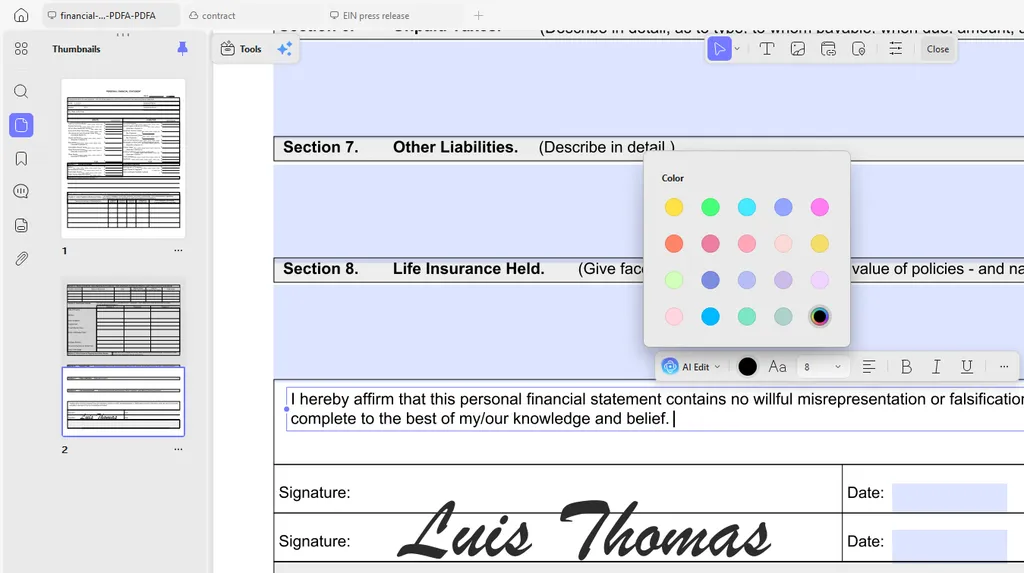
Form work sits in the same place. You can fill fields and build interactive forms. Handwritten and image-based signatures are supported, and saved signatures sync across devices.
Convert Without Losing the Layout
Sometimes the PDF is only a starting point. A financial statement needs to become a spreadsheet. A deck needs to go back into PowerPoint. A supplier contract needs to reach a team that works in Word.
UPDF can convert PDFs into 14 formats, including Word, Excel, PowerPoint, PNG, JPEG, HTML, and PDF/A. Conversion runs the other direction too. UPDF lists up to ten methods for creating a PDF. Sources include Word, Excel, PowerPoint, images, a blank page, and the clipboard.
Two details matter for anyone doing this at volume. Page-range selection means you can export only the section you need. Batch conversion has no stated file-count ceiling. A folder of scanned statements can go through in one run.
Check the Numbers Yourself
Feature lists are easy to write and hard to verify. The console below carries the specifications UPDF publishes on its own product pages. Every answer links back to its source. Click a command, or type one.